
Fourteen popular agent habits, sorted by what the tool makers' own documentation says, with a first-week plan for picking three.

Sorted by evidence, nine of fourteen popular agent hacks hold up, four come with caveats and one (persona backstories) is not worth it. Start with a written finish line, a check the agent runs before it says done, and clearing context between tasks. Keep one job per agent, read everything before you install it, and score your pilot on use, persistence and impact.
A first agent usually goes wrong in a predictable way. It gets a loose instruction, nothing to check itself against and a conversation that keeps growing, and what comes back looks finished without being right. Most popular agent habits are repairs for that one pattern.
Sorted by the job they do, the habits fall into three groups: ones that say what good looks like, ones that check the work, and ones that change what the work costs. We read Anthropic’s documentation, the tool makers’ pages and, where one exists, the original paper for each habit on October 19, 2026. We haven’t run a controlled test, and nothing here is our benchmark.
“Works” means the tool’s own documentation recommends it. “Caveat” means it carries a cost the hype leaves out. “Skip” means we found no support for the usual claim.
| Habit | Evidence we found | Verdict | Best used when |
|---|---|---|---|
| 1. Write down what done and bad look like | Anthropic says to give the agent a way to check its work. Threat-and-reward prompts: no support | Works, without the threats | Jobs you repeat |
| 2. A personal glossary | Fits Anthropic’s advice that specific instructions are followed more consistently | Works | Jargon-heavy jobs |
| 3. A scored matrix to pick the first agent | No study; the scores are your opinions | Works as a judgment aid | Before building |
| 4. An interview-built profile | Anthropic recommends interviews; instruction files are context, not rules | Works, kept short | New agents |
| 5. Sketch the flow first | Matches Anthropic’s explore, plan, then build | Works | Multi-decision jobs |
| 6. A skill that builds skills | Skills are documented; skill-creator already runs tests | Caveat: test in a fresh session | Frequent builds |
| 7. Personas with backstories | No support found for better output; costs tokens | Skip (keep a one-line role) | Rarely |
| 8. Parallel agents | Subagents documented; teams experimental and token-heavy | Caveat | Independent tasks only |
| 9. Browser automation | Playwright’s docs warn about untrusted page content | Caveat | No export or API exists |
| 10. Trimming output tokens | Self-reported by one community project; output only | Caveat | After bigger levers |
| 11. The cheapest capable model | Anthropic’s costs page says match model to job | Works | Routine tasks |
| 12. A built-in check and a second reviewer | Anthropic’s headline advice | Works | Costly mistakes |
| 13. Hooks and approval gates | Instruction files are advisory; hooks are deterministic | Works | Send, pay and delete steps |
| 14. Context hygiene | Anthropic’s best-practices and costs pages | Works | Long sessions |
Our reading of the pages, not test results.
Nine came through clean. Each says what good looks like, adds a check, or controls what loads into the agent’s context. The four caveats cluster around power and cost, where the claims are biggest, and the one skip is the persona.
A hack has earned its place when someone other than its promoter says it works.
A finance analyst asks an agent to tidy the variance table and gets back a different table with better headings. The instruction had no finish line, so “done” meant whatever the agent decided.
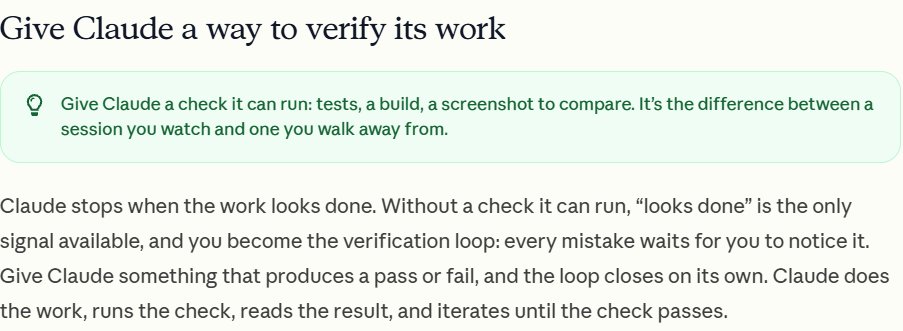
The first habit is to write down both ends before the agent starts: what a finished result looks like and what a miss looks like, with an example of each. Anthropic’s best-practices page makes the same point for coding. Without a check the agent can run, “looks done” is the only signal available, and you become the checking step.[1]
You’ll also see this wrapped in threats and rewards, such as telling the agent it’ll be shut down if it fails. A prompt changes what the model sees on one request. It doesn’t retrain the model, so there’s no learning loop for a reward to feed. The best-known evidence is a 2023 paper that added emotional phrases and reported gains on 45 tasks with models of that time, including ChatGPT and GPT-4.[2] Those phrases were encouraging, none of them threats, the authors call it uncertain whether models grasp emotion, and a plain finish line does the same work.
Write down what done and bad look like before the agent does anything.
| Field | Weekly pipeline update |
|---|---|
| Done looks like | One page. Starts with what changed since last week. Every number traces to a row in the CRM export. Ends with up to three questions |
| Bad looks like | A restated total with no change, a number not in the export, or explanation before the first number |
| Glossary | At risk: no logged activity since the last update. Slipped: close date moved later than in last week’s update |
| Stop and ask when | A column is missing or totals don’t match the previous update |
The glossary row is the one people skip. Two lines of definition remove most of the guessing.
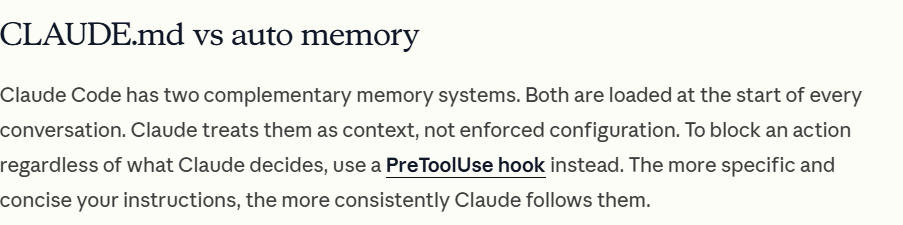
The second habit is a glossary for words that mean different things to different people, such as “recent”, “at risk” or “good”. Let the agent ask you what you mean, then store the answers in your instructions file. Anthropic describes that file as context, not enforced configuration, so a glossary guides the agent without guaranteeing anything.[3] Our explainer on CLAUDE.md and MEMORY.md files covers what belongs in it.
| Before you start the task below, list every word in my instructions that could mean more than one thing. Ask me what I mean by each, one question at a time, then write my answers as a short glossary. Do not guess a definition. If I skip one, mark it OPEN. Task: [PASTE YOUR TASK] |
The OPEN lines are the words to settle with a colleague.
The second group shapes the agent itself, and each habit makes the person do the thinking before the agent does the typing.
The first is to let the AI interview you instead of writing the brief from a blank page. Anthropic recommends this for larger tasks: start with a short prompt, let the agent ask about the hard parts you hadn’t considered, and have it write the spec before building. In Claude Code the interview runs through a tool called AskUserQuestion. In other chat tools you ask for it in words.[1] The same interview can produce a short profile of how you write and work. Keep only lines whose absence would cause mistakes, and skip personality-type sorting, which we found no documentation for.
The second is to sketch the decision flow before building. A marketer who wants an agent to turn a campaign brief into draft emails can draw five boxes on paper first. That follows Anthropic’s explore, plan, then build order, and its page adds a limit: if you could describe the change in one sentence, skip the plan.
A blank box is the question to answer before building.
The third is a skill that builds skills. A skill is a folder with a SKILL.md file; Anthropic’s docs say only its short description sits in context, and the body loads when the skill is used.[4] Anthropic already ships a skill-creator plugin that writes test cases and compares versions, so you may not need your own. Whichever you use, run the new skill in a fresh session, because the session that built it already knows what you meant. Make a job a skill when it repeats and needs more than a few lines; if it’s three lines, leave it in the instructions file.
Three habits add power, and risk with it. The first is running several agents at once.
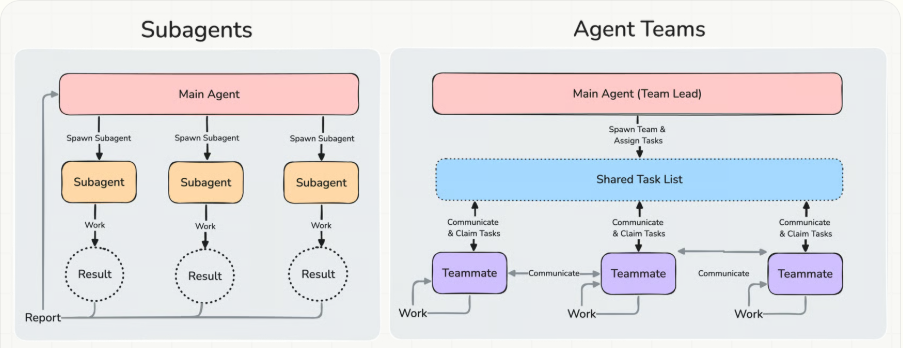
A common assumption is that ten agents finish ten times faster, and it holds only when the pieces are independent. A marketer who gives three competitor pages to three subagents gets three summaries back without cluttering the main conversation. The same marketer drafting messaging from those summaries is doing sequential work, which belongs in one session. Each subagent has its own context window and sends back a summary.[5] Our guide to agents and subagents goes deeper.
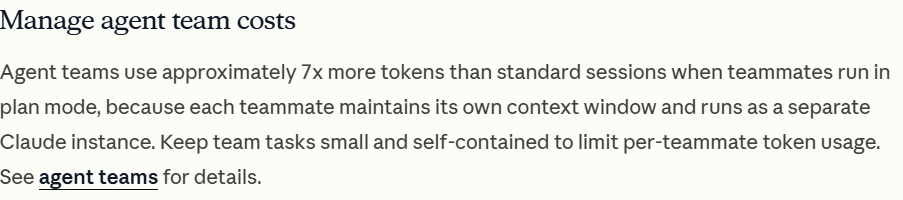
Agent teams, where teammates message each other, are the heavier option. Anthropic’s page says they’re experimental and disabled by default, that sequential and same-file work does better in one session or with subagents, and that three to five teammates is the place to start.[6] The costs page puts the overhead at approximately 7x the tokens of a standard session when teammates run in plan mode.[7] Run in parallel only when pieces don’t depend on each other.
The second habit is browser automation. Playwright’s docs say its MCP server works from the page’s accessibility tree, not pixels, that one tool is RCE-equivalent and should only be enabled for trusted clients, and that page-supplied tools and results are untrusted input.[8] The decision rule is to try an export, an API or a command-line tool first, and use the browser only when nothing else exists, with a check such as rows collected against rows on the page.
The third habit adds scrutiny, and I’d adopt it first. Ask the agent to show evidence before it says it’s done, then have a second agent review in a fresh context. Anthropic says a fresh reviewer isn’t biased toward code it just wrote, and to tell it to flag only gaps that affect correctness, because a reviewer asked to find problems will usually find some.
| Before you tell me this is finished: list the checks you ran, show the evidence for each (the numbers and where they came from), and name anything you could not check. If a check failed, say so and stop. Do not call the work complete until the evidence is on the page. |
For the reviewer, paste the draft and brief into a new conversation and ask for only the gaps that break a stated requirement.
Last are rules that run themselves. Instruction files are advisory, and for an action that must happen every time or be blocked, Anthropic points to a hook. Outside Claude Code, build an approval step so sending, paying or deleting waits for a named person. Our guide to human-in-the-loop guidelines covers how deep that review should go.
Cost hacks get the loudest claims, so read them slowest. The most quoted is trimming output tokens. A community skill called Caveman does this by telling the agent to answer in clipped prose. Its page self-reports a 65% cut in output tokens on a ten-prompt benchmark, and says in the same place that input and reasoning tokens don’t change, that its rules add input tokens every turn, and that on work that was already terse you can lose money.[9] Output is the visible part of the bill, and in my reading Anthropic’s costs page puts bigger levers first: context size, model choice, thinking effort and moving specialist instructions out of the always-loaded file.
Model choice is the clearest lever. That page says Sonnet handles most coding tasks well and costs less than Opus, and suggests a haiku model for simple subagent tasks, which you set through each subagent’s model field. Names and prices change, so check the current model list and treat “cheapest capable” as a test you run, not a setting you assume.
| Task type | What to use | How to check |
|---|---|---|
| Reformatting text into a fixed layout (an HR partner tidying job descriptions) | A smaller model | Run five real inputs and compare with answers you’ve already checked |
| Summarizing long documents (a finance analyst reading contracts) | A mid-sized model | Check every figure and quoted clause against the source |
| Drafting for a client (a consultant’s proposal) | A stronger model plus a human edit | A named person reads all of it before it leaves |
No prices, because they change. Move a task to a cheaper model only after it passes your check.
The third lever is context hygiene. Anthropic calls the context window the most important resource to manage, since performance degrades as it fills. Clear between unrelated tasks, and after two failed corrections clear and write a better first prompt.[1] The costs page adds two more: keep the instructions file under about 200 lines, and remember thinking tokens are billed as output, so lower effort on simple tasks saves cost.
In my view the cheapest habit is the dullest: start a fresh conversation when the job changes. Our explainer on what drives your AI costs shows why a long conversation costs more with every message.
A popular rule of thumb says to give each agent three to five responsibilities. We found no study behind that number. Anthropic’s engineers advise finding the simplest solution possible and adding complexity only when needed, and note that agentic systems often trade latency and cost for better task performance.[10] So the useful version is one job per agent, split when the job gets crowded, rather than a number.
Four signs show a job is crowded:
One job per agent. Split it when it needs two definitions of done.
| Field | Pipeline update agent |
|---|---|
| The one job | Turn the CRM export into the weekly pipeline update, using the done-and-bad definitions on its brief |
| Inputs | The weekly export and last week’s approved update, nothing else |
| Tools allowed | Read the export, write a draft. No email, no CRM edits, no browsing |
| The check | Lists the rows behind each number; a second agent compares totals with last week |
| Stop and ask a human when | A column is missing, totals don’t reconcile, or a deal looks like a data error |
| Owner and review | Operations lead, at the start of each quarter |
The tools row and the stop row do the most protecting. Write them first.
| What the agent does | What the human still owns | How it gets checked |
|---|---|---|
| Drafts the update and lists the rows behind each number | Decides which changes deserve attention | The ops lead spot-checks a few rows before it goes out |
| Flags moved deals using the glossary | Owns the glossary and changes it as the business changes | Reviewed at the quarterly job-card review |
| Compares totals with last week | Decides whether a gap is real or a data error | An unreconciled total stops the run and goes to the owner |
Anything touching a named person or a customer decision keeps a human decision at the end.
This is where the persona habit falls apart. A job card replaces the backstory. A one-line role such as “you prepare the weekly pipeline update for the operations lead” is enough, and we found no evidence that a name and a history improve output, though they do spend tokens. If an agent talks to customers, say it’s an AI rather than inventing a human biography.
Decisions about people are the clearest job not to hand over. Our guide on when not to use AI at work gives a fit test, and for a first build see our practical guide to building an AI agent.
Some of the most casual advice in this genre is also among the riskiest: paste this prompt and it will install skills on your computer. A stranger’s prompt can contain instructions or scripts you haven’t read, and an agent that follows them runs with your access.
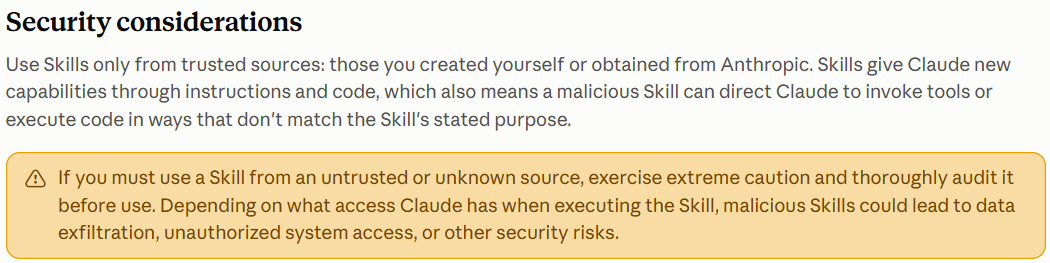
Anthropic’s Agent Skills documentation says to use skills only from trusted sources, meaning ones you created yourself or got from Anthropic, because a malicious skill can direct the agent to use tools or run code in ways that don’t match its stated purpose.[11] The Claude Code skills page adds that a skill can pre-approve tools and can grant itself broad access, so review that setting first.[4] We found no page on pasted install prompts specifically; this skills guidance is the closest primary source.
| Check | What to look for | If it fails |
|---|---|---|
| Read every file | Instructions, scripts and anything it downloads | Don’t install it |
| Check what it may use | Tools it can run without asking, such as email, deletion or web access | Remove the permission or skip it |
| Look for network calls | Anything fetched from a web address, which can change after you review it | Skip it |
| Prefer reviewed sources | Your own work, Anthropic’s, or something your IT team has reviewed | Ask IT or security first |
| Test in a throwaway space | A folder with no client, employee or financial data | Keep it out of real folders |
Our working checklist, not a substitute for your security team’s review.
Treat web pages and tool output as input, not instructions, and check with IT, security and legal before any step touches customer data.
Fourteen habits is too many to adopt at once. Pick one from each job: one that defines, one that checks and one that controls cost. A good first three for most people are the done-and-bad brief, the evidence prompt and clearing between tasks. The right three shift by role:
To choose the first job, use the matrix habit. Score each candidate 0 to 2 on five questions: does it repeat, is the finish line clear, is it easy to check, is a miss low-harm, and does it have an owner. The scores are opinions, so the matrix makes them visible and arguable, not settled.
| Candidate job | Total of 10 | Read |
|---|---|---|
| Weekly pipeline update | 10 | Build first |
| Replies to supplier emails | 7 | Sharpen the finish line first |
| Shortlisting job candidates | 4 | Keep with people |
Illustrative scores, not data. Bands: 8 to 10 build, 5 to 7 sharpen, 0 to 4 not ready.
| Day | Do this |
|---|---|
| Day 1 | Choose one weekly job with the matrix and write its done-and-bad brief |
| Day 2 | Run the glossary prompt and paste the answers into your instructions |
| Day 3 | Add the evidence prompt and run the job on real work |
| Day 4 | Try a smaller model and compare it with your checked answer |
| Day 5 | Fill in a job card and score the use question below |
Five short sessions.
Score the pilot on the lens we use for any AI rollout: use, persistence, then impact. I’d weight impact most heavily.
| Stage | Question | 0 | 1 | 2 |
|---|---|---|---|---|
| Use (day 7) | Did you run each habit on a real job? | None | One or two | All three |
| Persistence (day 30) | Still running them without a reminder? | No | Some | All three |
| Impact (day 30) | Can you point to a miss caught or a rework avoided? | No | Vaguely | Yes, with an example |
Total 0 to 2: did not stick. 3 to 4: promising. 5 to 6: worth sharing. Not a validated scale.
Teams can start this internally. Expert-led training shortens the learning curve and spreads the setup across a team instead of one keen person, and our corporate workshops cover that. For what to do after week one, see agent pilots worth running this quarter.
The ideas travel and the features don’t. A finish line, a glossary, a check and a one-job card work in any chat or agent tool. Hooks, skills, subagents and agent teams are Claude Code features, where we verified them. We haven’t checked other tools’ versions.
Sometimes. Anthropic says the extra tokens are usually worthwhile for research, review and new feature work where teammates operate independently, and not for routine or sequential tasks. Since the feature is experimental, start small, with something like a draft review from three angles.
We found no evidence that it does. A prompt changes one request and doesn’t train the model, and the best-known paper tested encouragement on 2023-era models. To test a phrase on your own work, run the same five real inputs with and without it and compare with answers you’ve checked.
As few as keep one definition of done. Split an agent when its instructions keep growing, when parts need different data access, or when you can’t tell which part failed, and merge two only if they run together and share one check.
Not by default. Anthropic advises using skills only from sources you trust and auditing any other before use. Read every file, check which tools it can use without asking, and try it in a throwaway folder with no work data. Ask IT or security before using it on company material.
Sources were read on October 19, 2026: Anthropic’s Claude Code, Agent Skills and engineering pages, Playwright’s MCP page, the 2023 emotional-prompt paper and the Caveman project page. Documentation changes often and Caveman’s figures are self-reported, so weigh them as evidence. The verdict table, matrix, job card, cost cheat sheet, install checklist and scorecard are Future Factors working views, not validated models, and we haven’t run these habits through a controlled test. The topic came from a request to sort a popular list of agent tips; we checked each habit against the sources and did not reproduce that list. Features outside Claude Code were not checked. The scenes are illustrations, not client stories. We left out prices, model names and any claim we couldn’t confirm at a primary source.
