
From October 6, 2026, new Claude Cowork tasks on Pro and Max plans run in the cloud. Here's what changed, what Anthropic's pages say about why, where each task should live, and how to keep the logic yours.

New Cowork tasks run in the cloud from October 6, 2026, and existing local tasks keep running until they’re done. Anthropic states no reason, so this guide sticks to what its pages show. Ask three questions of each task: what does it touch, where may its data go, and must it run with the laptop closed. Then keep each task’s logic on a card you own.
Until October 6, Cowork had a setting called Only on your computer, which kept your tasks running on your own machine. That setting is gone. On Pro and Max plans, new Cowork tasks now run in the cloud, on Anthropic’s servers, and there’s no setting to choose where a task runs.[1]
Nothing you already started is switched off. Tasks you began on your computer stay there until they’re done, each with a banner saying it runs only on this computer, and scheduled tasks that already run on your computer keep running there. If you were still set to run Cowork only on your computer, the desktop app moves you to the cloud the next time you open it, with a notice, and you can’t switch back.[1]
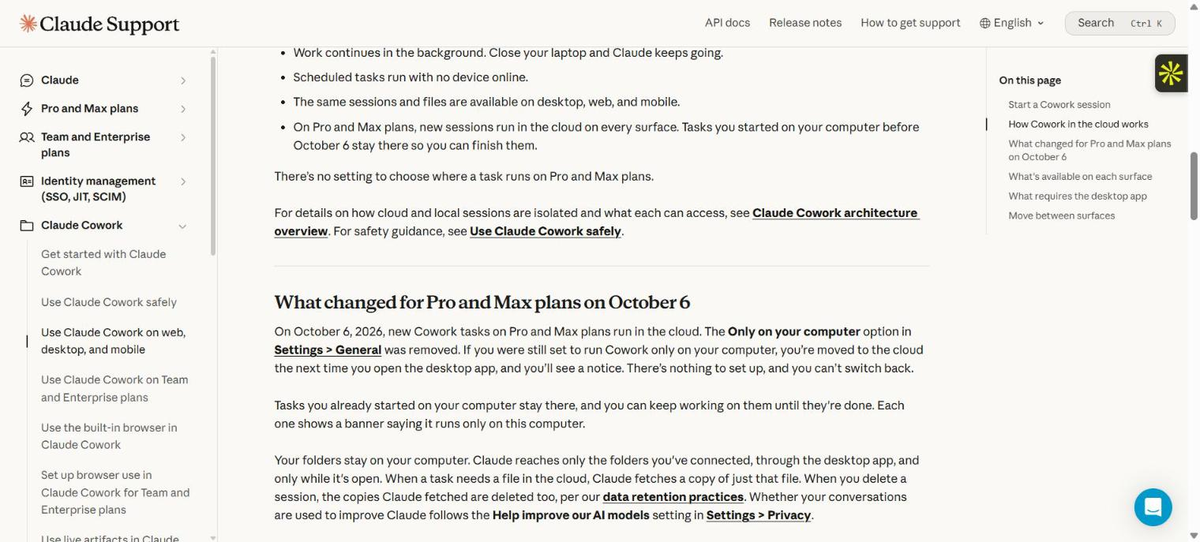
In practice you now have two kinds of task. One that needs only your connectors and the files saved to your Claude account is at home in the cloud, and it keeps running with your laptop closed. One that needs a folder or app on your machine has two routes: Claude Code in the desktop app, which Anthropic says runs on your computer and keeps your folders and history there, or the cloud with the desktop app left open. Three questions sort which is which:
Names and menus change regularly, and Anthropic says Cowork is being folded into the main Claude experience, so some labels may look different on your screen. New to the product? Start with our plain-English guide to Claude Cowork.
Anthropic’s pages don’t state a reason for retiring the Only on your computer option, and I’m not going to guess at one. What they do show is a difference in how the two kinds of task work. A task on your computer needs the Claude Desktop app open and the machine awake. A cloud task doesn’t, and Anthropic’s help page opens by saying running tasks in the cloud lets Claude keep working when your computer is closed and brings Cowork to web and mobile.[3]
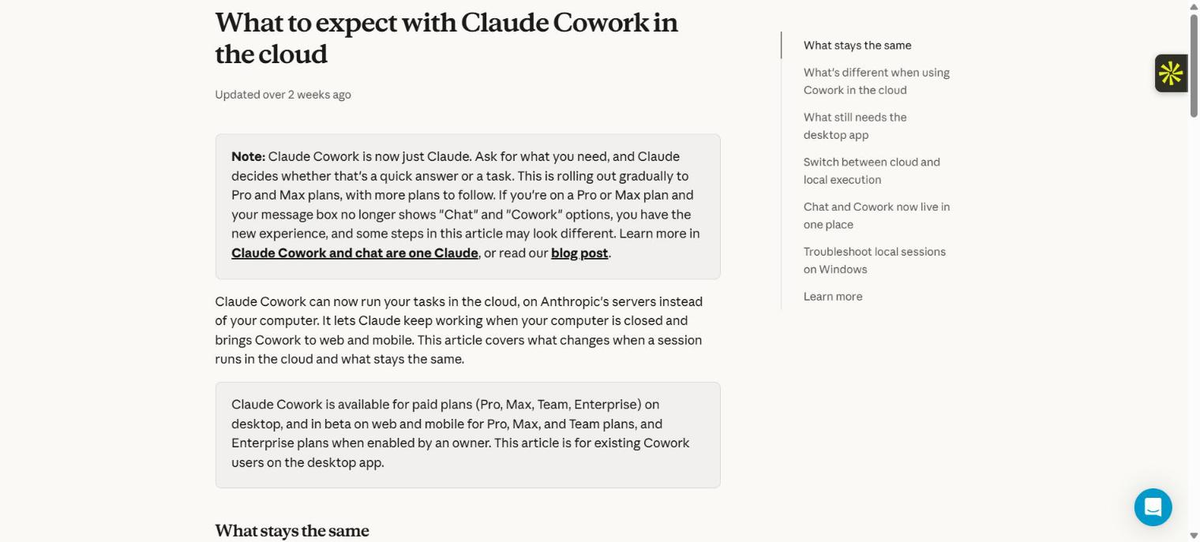
That benefit suits scheduled work, which Anthropic says runs on its cadence even when your computer is asleep.[2] There is a trade-off: cloud tasks reach your folders and local connectors only while the desktop app is open. A fair reading is a product choosing where the work runs, not a feature quietly disappearing. What’s left for you is deciding which tasks belong where.
Anthropic’s pages give each question a practical answer. For the first, cloud sessions work with files saved to your Claude account and your connectors, while folders on your computer, local connectors, browser use and computer use need the desktop app open.[1] For the second, a cloud task that needs a local file gets a copy of just that file, deleted when you delete the session. Whether that suits client contracts or employee records is a call for your privacy lead or IT admin. Work that has to stay put belongs in Claude Code.
The third question catches the quiet failures. A local scheduled task in Claude Code Desktop only fires while the app is open and the computer is awake, and when the machine wakes it starts one catch-up run for the most recently missed time within seven days.[4] So a Monday 7 a.m. task can arrive on Wednesday evening.
| Your answers | Where it points | What to watch |
|---|---|---|
| Touches only account files and connectors. Data can pass through the cloud. | Cowork in the cloud, the default for new tasks. | Check it still has every connector and file it needs before you trust the first run. |
| Touches local files or apps. Data can pass through the cloud. The laptop stays open. | Cowork in the cloud with the desktop app open, or Claude Code on your desktop. | Our rule of thumb: document-style work suits Cowork, and scripts, projects and folder-bound work suit Claude Code. |
| Touches local files. Data must stay on the machine. | Claude Code on your desktop. | The app must be open and the computer awake. A closed lid still sleeps the machine. |
| Touches local files and must run with the laptop closed. | No single home yet. | Move the inputs somewhere your account can reach, or accept that it runs only when the machine is on. |
A Future Factors placement guide built from Anthropic’s help pages and Claude Code documentation, checked October 6, 2026. It does not replace your data policy.
Place a task by what it touches, not by where it was first created.
An operations lead’s Friday job reads a folder of supplier exports, so the first question settles it: the folder is the input. The same lead’s Monday digest, built from a shared inbox and a calendar connector, has no such tie and no reason to stay on the laptop.
This view helps in the conversation with IT or legal. Claude Code’s cloud routines are a research preview.
| Cowork on your computer (existing tasks) | Cowork in the cloud | Claude Code on desktop (local task) | Claude Code cloud routine | |
|---|---|---|---|---|
| Where the work runs | Your computer. The agent loop runs on the device and code runs in a VM. | Anthropic-managed servers, in an isolated, temporary sandbox. | Your machine. | Anthropic-managed cloud by default. |
| Where history lives | Not specified on the pages I read. | Saved to your Claude account. | Your computer, with your folders. | Each run is a session in your account. |
| Needs your computer on | Yes, it runs there. | No, except local files, local connectors, browser use and computer use, which need the desktop app open. | Yes. App open and computer awake. | No. |
Compiled from Anthropic’s help pages and Claude Code documentation, checked October 6, 2026. Where a cell says not specified, the pages didn’t say.
New scheduled tasks on Pro and Max run in the cloud and can’t use local folders or local connectors, while existing local scheduled tasks keep running locally.[3] To move a task into Claude Code, Anthropic’s help page gives three steps: open the task and select Download task data, unzip the download and open the folder in Claude Code, then run /port-task-data to pick up with your context. It also offers Export your Cowork data on the desktop home card to keep a copy of everything.
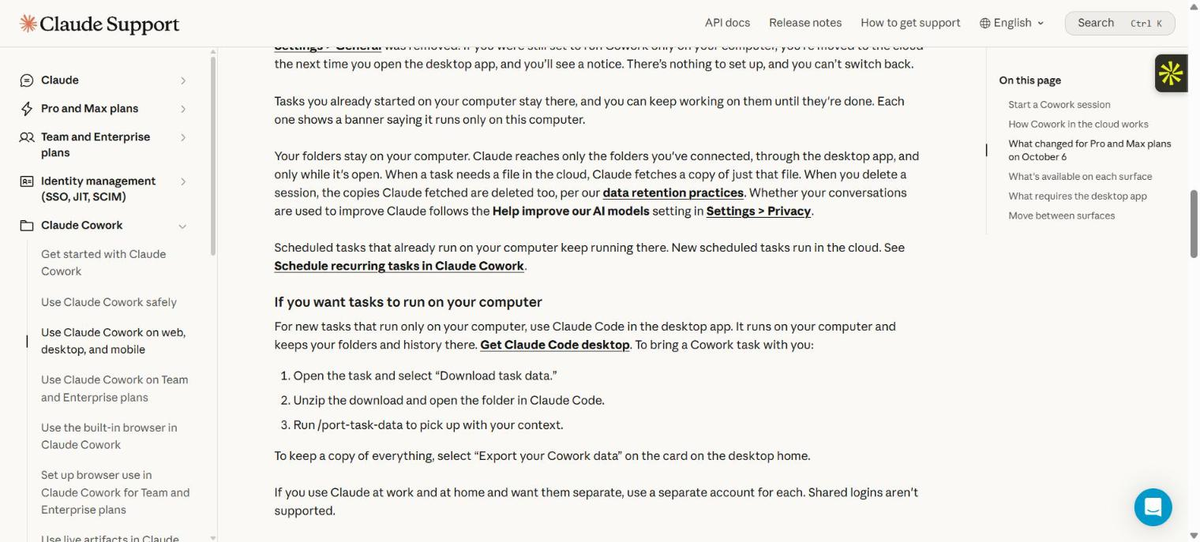
That carries your context across. Keep your own written copy of what each task is meant to do as well.
Moving tasks in a hurry is how a Monday digest quietly stops arriving. Start with a list. Claude can draft it, but only from what it can see, so check it against the Scheduled list in the app.
It asks for UNKNOWN instead of guesses and changes nothing.
Paste the result into the register below, then add what Claude can’t know: the owner, the master copy and the check.
| Task and what it touches | Schedule | Owner | Destination | Master copy of the logic | How it’s checked |
|---|---|---|---|---|---|
| Monday campaign digest. Reads ad-platform and analytics connectors, writes a summary to a shared doc. | Mondays, early | Marketing manager | Cowork in the cloud | Team prompt library, dated version | Manager checks headline figures against the dashboards |
| Friday supplier mismatch check. Reads exports in a local folder, flags differences. | Fridays | Operations lead | Claude Code on desktop, because the data stays on the machine | Operations wiki page, task card | Lead samples flagged rows against the source files |
| Monthly open-requests summary. Reads a requests spreadsheet on a shared drive, drafts a status note. | Monthly | HR business partner | Claude Code on desktop until the privacy lead confirms cloud handling | HR SOP folder, privacy lead owns the data rules | Partner reads the note against the spreadsheet |
Illustrative rows. Replace them with your own tasks and destinations.
Teams need one more column answered, which is who owns it. Claude Code routines belong to an individual claude.ai account and aren’t shared with teammates, per Anthropic’s documentation.[5] A named owner and a shared master copy matter because the task may be visible only to the person who made it. Marketing managers, operations leads, HR business partners, solo consultants and IT admins own different tasks, and the register shows them together. If a row makes you doubt the task should exist, our workflow diagnostic helps.
A task is a runner: the button, the schedule and the place where instructions happen to execute. The asset behind it is everything that makes the output good. If all of that lives inside one task, chat or app, you have a rental. If it lives in documents you control, the task can be rebuilt on another runner in an afternoon. Keep these outside the tool:
Claude Code’s own scheduled tasks show why the extras matter. A local task is stored as a SKILL.md file holding its name, description and prompt, while the schedule, folder, model and on or off state sit outside that file.[4] A copy of the prompt alone doesn’t rebuild the task, so the card below records the schedule and inputs too.
Keep the master copy of a task’s logic where you control it, and treat every task as a copy.
Don’t use AI like a vending machine, where you request, take the answer and move on. Leverage comes from repeatable systems you can carry across tool changes. A shared prompt library holds the instructions, a good SOP holds the human version of the job, and our guide to writing Cowork prompts covers the instruction text.
| Field | Supplier mismatch check |
|---|---|
| Job | Compare Friday’s supplier exports with the purchase-order list and flag rows that don’t match. |
| Runs | Fridays, mid-morning. Fine to arrive late. |
| Inputs and where they live | Exports and purchase-order list in the local finance folder. The data stays on this machine. |
| Instructions | Master copy on the operations wiki page “Supplier mismatch check”, dated. The task holds a pasted copy. |
| Output | A short list of mismatches with file and row, saved to the team folder. |
| Must not do | Email suppliers, edit the exports or mark anything as resolved. |
| Owner and check | Operations lead samples flagged rows against the source files each week. |
| If it stops | Ask who last read the output, then rebuild from this card. |
One page per task, kept beside the instructions and not inside the tool. The fields people tend to leave blank are Must not do and Owner and check.
Nobody watches unattended tasks run, which makes the human side tempting to skip.
| What Claude does | What the human still owns | How it gets checked |
|---|---|---|
| Pulls figures from connected tools and drafts the Monday digest. | Deciding which movements matter and what goes to leadership. | The marketing manager compares headline numbers with the source dashboards before forwarding. |
| Compares supplier exports and flags mismatches. | Deciding which mismatches are real and contacting suppliers. | The operations lead samples flagged rows against the source files each week. |
| Drafts a status note from the requests spreadsheet. | Any employee-facing message and any call on a sensitive case. | The HR business partner reads the note against the spreadsheet. The privacy lead reviews data handling each quarter. |
| Drafts the inventory and the task cards. | Deciding where each task lives and signing off the card. | The IT admin or team lead reviews the register each quarter. |
The review cadence is a suggestion. Set it to match how much damage a wrong output could do.
Measuring whether the move worked takes more than checking that a task ran. Use comes first: did it run on schedule after the move? Persistence is next: a month later, is it still running, still read and still owned, without a manual rescue? Impact comes last: did anyone act on the output, and would the team notice if it stopped?
Teams can start internally with a spreadsheet and an afternoon. The harder part is writing instructions a colleague can run without the author in the room. Training builds that skill, and a workshop shortens the learning curve across a team. The register and cards are workflow design, because they give the skill somewhere to be used. The quarterly review is reinforcement, and adoption is what you see afterwards: people reaching for the card before the task. Our human-in-the-loop guide covers the review column.
Tasks you already started on your computer stay there until they’re done, which gives you room to move in order. A checklist works better than a deadline here. Score yours, one point per line.
| Habit | Point if |
|---|---|
| 1. Keep the history | Task data for your important tasks is downloaded (Download task data, or Export your Cowork data) and saved somewhere you control. |
| 2. Document before you move | Every task you rely on has a card with job, inputs, instructions, output, must-not-do and owner. |
| 3. Pilot one | One low-stakes task has run to completion on its new home and its owner checked the output. |
| 4. Master copy outside the tool | The instructions for each task sit in a shared place, not only inside the task. |
| 5. Clean up as you go | You retired, merged or tightened at least one task nobody was reading. |
Scoring: 5 means move the next group. 3 or 4 means close the gaps on your most important task first. 0 to 2 means hold anything important and start with cards for your top three tasks.
Move one low-stakes task first, and run it to the end before you touch one that matters.
Pick the pilot by consequence: a task whose output only you read, with data that’s fine in the cloud, which you could rerun by hand. Run it once on the new home, compare the output with the last run on the old one, and write down what changed. Use the move to retire the digest nobody opens.
Before you close this page, open the Scheduled list in Claude, pick the one task you’d miss most if it vanished, and fill in its card. Any field you can’t complete is your first piece of work.
Not on Anthropic’s description. Tasks you already started on your computer stay there until they’re done, each with a banner saying it runs only on this computer, and scheduled tasks that already run on your computer keep running there. New tasks and new scheduled tasks on Pro and Max plans run in the cloud.
Use the placement questions. Account files and connectors only: cloud. Tied to a folder, script or project on your machine: Claude Code on your desktop, with the app open and the computer awake.
Anthropic’s help page describes a hand-off: select Download task data on the task, open the unzipped folder in Claude Code and run /port-task-data. It brings your context along, so check the result and keep your own task card for the schedule, inputs and checks.
That depends on the material and your organization’s rules, so ask your privacy lead or IT admin. Anthropic says Claude fetches a copy of just the file a task needs and deletes the copy when you delete the session.
Anthropic describes the October 6 change for Pro and Max plans. For Team and Enterprise, its pages say admins control Cowork access through an admin toggle, and Owners can switch routines off for the organization. Check your admin settings and Anthropic’s pages for your plan before assuming the same dates.
This guide was written by Hina Mian, Co-Founder of Future Factors AI. Facts about the change come from Anthropic’s own pages, read in a browser on October 6, 2026: its Cowork help articles, the architecture overview, and the Claude Code documentation for desktop scheduled tasks and routines. Anthropic edits these pages as the rollout continues, so check the live versions before you act. The three screenshots are of Anthropic’s own help pages, credited in each caption. They show what Anthropic’s pages said on October 6, 2026, not our own interface. Anthropic’s pages give no stated reason for the change, so this guide describes the benefit they name and does not speculate on motive. Two public posts, by Frank Andrade on Artificial Corner and Dinah Davis on Substack, prompted this piece. I didn’t use either as a source for facts, and the paywalled steps in the first were not read. The placement test, task card and migration checklist are Future Factors working tools, not Anthropic features or compliance standards, and the register rows and the card are illustrations, not client stories. This article is not legal or privacy advice. Ask your privacy lead or IT admin about any data that has to stay on a machine.
