
ChatGPT ads don't work like a Google keyword or a Meta audience. Here's the actual setup process, checked against OpenAI's own documentation, plus what to test first.

ChatGPT ads are sponsored cards shown below a ChatGPT response, matched to conversation context rather than a keyword you bid on or an audience you build. Free and Go plan users see them; Plus, Pro, Business, Enterprise, Edu, and under-18 accounts never do. Setting one up means creating an Ads Manager account, waiting on verification, then building a campaign, an ad group with context hints, and an ad. Minimum daily budget is currency-based ($25 USD). Cost comparisons to Google or Meta are still early and directional, and any AI-drafted ad copy still needs a named human to approve the claims before it goes live.
Picture a small business owner who has run Google Search ads for years: pick a handful of keywords tied to what people type when they’re ready to buy, set a bid, write a headline. An email lands in her inbox saying ChatGPT now takes ads and self-serve sign-up is open. She clicks through expecting the same shape, a keyword box and a bid field. There isn’t one, and that’s the part that trips up almost everyone arriving from Google or Meta.
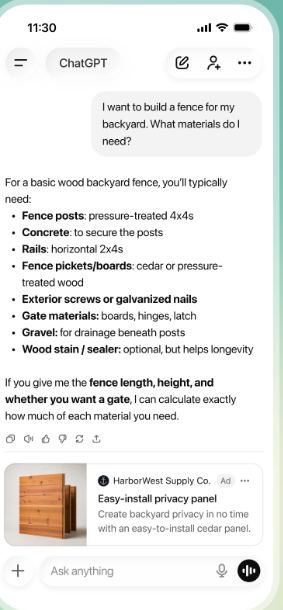
A ChatGPT ad is a sponsored card that appears below the model’s response, not above a list of search results and not inside a social feed. It carries an advertiser name, a small logo, a headline, a short line of copy, an image, and a link, and it sits underneath whatever ChatGPT just told the user. Ask about backyard fencing and you might see a materials supplier’s card appear right after the list of what you need, not instead of the answer.
That placement is the whole idea. Ads in ChatGPT are matched to what a conversation is actually about at that moment, not to a phrase someone typed into a search bar or a set of demographic boxes an advertiser checked. OpenAI’s own systems weigh the context and intent of the conversation, the ad’s landing page and copy, and, when a user has personalization turned on, select signals from that person’s broader ChatGPT use.[1] There’s no keyword list to bid on and no age-and-income audience to build, which is the single biggest adjustment for anyone coming from Google or Meta.
The self-serve product itself is also younger than most of the advertising tools you’ve used. OpenAI’s Ads Manager Beta, at ads.openai.com, is where every campaign gets created and managed, and self-serve access has only existed for several months.[3] Everything in this guide was checked directly against OpenAI’s own Help Center on September 17, 2026, because a beta product like this one changes its rules, its minimums, and its country list often enough that a guide written even a few weeks earlier can be quietly wrong.
| Platform | What decides if your ad shows | Ad unit | Who never sees it |
|---|---|---|---|
| ChatGPT Ads | Conversation context, your context hints, and a relevance-weighted bid | A sponsored card below a ChatGPT response | Plus, Pro, Business, Enterprise, and Edu accounts, plus anyone under 18 |
| Google Search Ads | Keywords you bid on, matched to what someone typed | A labeled listing above or beside organic results | Anyone not searching a keyword you’re bidding on |
| Meta Ads | Demographic and interest targeting you build, plus behavior signals | A native post in a feed or Story | Users outside the audience you defined |
Summarized from OpenAI’s own ad-basics documentation and each platform’s standard ad-buying model. [1]
If you want the news version of how this rolled out, an invite-only pilot first, then wider self-serve access, rather than a setup guide, our earlier look at when ChatGPT ads opened up to more advertisers covers that story. This guide picks up from there: how to actually build a campaign.
Before you spend a dollar, it’s worth knowing exactly who can be shown your ad, because the eligible audience is narrower than most people assume.
Ads only appear for people on ChatGPT’s Free and Go plans who are logged in and confirmed to be adults. Anyone on Plus, Pro, Business, Enterprise, or Edu never sees an ad, and OpenAI doesn’t show ads to accounts it identifies as belonging to someone under 18, using a mix of stated age, account age, and usage patterns. Temporary Chats are ad-free too, and so is any conversation OpenAI’s systems flag as personal health, mental health, or political, regardless of plan.[2]
Geography is the other filter, and it has moved faster than most coverage of the launch suggests. Ads first went live for US users on February 9, 2026, then expanded to other countries as the test widened. Checked directly against OpenAI’s own country list on September 17, 2026, self-serve sign-up is listed as available in 56 countries, spanning North America, most of the EU and UK, several Gulf states, and markets including Japan, Korea, India, Brazil, and Mexico.[5] That’s a meaningfully wider list than the US, UK, Australia, New Zealand, and Canada picture from a few weeks earlier, so check the current list for your own country before you build anything else.
Two country-level details catch people out, per OpenAI’s own campaign documentation:[4]
If you run a single-location business that only serves customers nearby, none of this changes much for you. If you sell online across borders, plan on your first weeks of spend staying inside your account’s home country almost no matter what you select during setup.
Here’s the actual sequence, checked against OpenAI’s own account-setup and campaign documentation rather than a screenshot walkthrough that might already be a version out of date.[3] None of it requires code, and none of it requires an agency, though a couple of steps involve a wait you can’t shortcut.
The full account and first-campaign setup flow described below, drawn from OpenAI’s own Ads Manager Beta documentation. [3]

Two optional layers sit on top of that basic flow, and neither is required for your first campaign. Audience Tools let you upload your own customer data to build a custom audience, though inclusion targeting needs at least 25,000 matched people, well out of reach for most small accounts starting out.[4] Creative Tools use OpenAI’s own models to generate, localize, or adapt ad creative for you under a separate set of terms OpenAI published in June 2026, and a product feed lets a retailer turn an existing catalog into ads without building each one by hand.[7] Leave both alone until your first hand-built campaign has run for a couple of weeks.
If you’re the only person running this, budget half a day for setup, then check back once the approval email lands; the review queue is the part you’re waiting on, not your own effort. If you’ve got a marketing hire or a freelancer handling it instead, hand them the business-details and billing steps specifically. Those are the two places a solo founder tends to stall, waiting on a business license number or a card that’s actually registered to the company rather than a personal account.
Once your first campaign exists, the next decision is money: what you’re paying for, and how much. This is where Google and Meta habits cause the most confusion.
Ads Manager Beta gives you three objectives. Views (CPM) charges per 1,000 impressions and suits pure visibility. Clicks (CPC) charges per valid click and suits driving traffic. Conversions optimizes toward a specific action you define, billed either per valid click or per 1,000 impressions, and you never pay per conversion itself.[4] For a first campaign with no conversion tracking wired up yet, Clicks is the objective most small businesses can actually read and act on.
You set a maximum bid at the ad-group level: a CPM ceiling for a Views campaign, a CPC ceiling for a Clicks campaign. OpenAI suggests starting a CPC bid somewhere between $3 and $5, and ads are awarded through a relevance-weighted, second-price auction rather than a flat rate.
| Currency | Minimum daily budget |
|---|---|
| USD | $25 |
| GBP | £15 |
| EUR | €15 |
| CAD | $25 |
| AUD | $25 |
| INR | ₹725 |
Six currencies shown as examples from OpenAI’s full minimum-campaign-spend table, checked September 17, 2026. [4]
Budget pacing has its own quirk worth knowing before you set one and walk away. A daily budget is a target, not a hard ceiling: OpenAI can spend up to twice your daily amount on a strong day and up to seven times it across the budget week, which runs Sunday to Saturday in your account’s time zone. Don’t panic at a single expensive day. Look at the week.
ChatGPT ads target what someone is doing in this conversation, not who they are or what they typed into a search bar.
That’s the targeting difference worth sitting with. Context hints describe the conversations, topics, or use cases where your ad might be relevant, in plain language, similar to writing a one-line brief for a colleague rather than picking match types on a keyword list. OpenAI is explicit that these are not exact-match keywords and don’t guarantee your ad shows up in any particular conversation.[6] There’s no real equivalent to Meta’s saved audiences either, not for most accounts. Custom audiences exist, but the 25,000-person inclusion minimum puts them out of reach for a business that hasn’t built a large first-party list yet. What you actually control is which countries, platforms (Android app, Android web, desktop web, iOS app, iOS web), and locations you target, plus your bid and your context hints. That’s a shorter list of levers than Google or Meta gives you, on purpose, because the matching itself is doing more of the work.
Writing a context hint that actually lands starts with the same work as writing a good customer profile: naming who the offer helps and when, specifically, rather than broadly. If you haven’t done that exercise yet, our guide on building an ideal customer profile with AI is a reasonable place to start before you write your first hint.
Everything above gets you a live campaign. What you do in the first two weeks decides whether it was worth doing.
Start with one ad group tied to one clear offer, and write three to five ad variations inside it rather than one. OpenAI’s own guidance is to build for coverage: a wider, genuinely distinct set of titles and descriptions gives the matching system more chances to find a relevant moment, and repeating the same line in different words doesn’t help.[6] Our guide on using AI to write headlines that actually get clicks is a fast way to draft that variety before you touch Ads Manager.
AI drafting tools, including OpenAI’s own Creative Tools, can produce that volume of variation fast, which is exactly where a lot of small teams get into trouble. An ad claim about your product or service is still your business’s claim, whether a person or a model wrote the sentence, and Creative Tools can apply generated creative to a live campaign automatically under your existing settings unless you turn that off.[7]
| What AI does | What you still own | How it gets checked |
|---|---|---|
| Drafts multiple title and copy variations from your product page or brief | Deciding which claims are actually true and provable for your business | One named person reads every new ad before it’s submitted for review, not after it starts serving |
| Localizes or adapts creative automatically for a different context | Confirming the adapted version still matches your pricing, availability, and policy | Spot-check adapted variants weekly for as long as automatic adaptation stays turned on |
| Selects which of your existing ads to show in a given conversation | Setting the budget, objective, and targeting the selection happens inside | Reviewed against spend and click-through rate every week for the first month |
Based on OpenAI’s own description of what Creative Tools can and can’t do under its June 2026 Ad Tools Terms. [7]
AI can draft the ad. A named person at your business still has to approve the claim before it goes live.
Early signals move fast: impressions, clicks, and click-through rate can show up within minutes of launch, though spend reporting lags behind, so a campaign showing $0 spent with real clicks already logged isn’t necessarily free.[1] That’s the Use stage, and it’s the easiest one to check. Persistence is whether your click-through rate holds up once the first-week novelty wears off, not just whether people clicked on day one. Impact is whether those clicks turn into the outcome you actually wanted, tracked through your own UTM parameters or a connected conversion event, not the platform’s click count alone. A campaign measured only on impressions and clicks has measured that people noticed it, nothing more.
Start at the minimum daily budget OpenAI sets for your currency, not the total you’re eventually willing to spend.
| Question | Score 1 point if |
|---|---|
| Is your ad account fully verified and free of a “Not serving” flag? | Yes, consistently for the last week |
| Has click-through rate held steady across at least 5 to 7 days? | Yes, not just a single early spike |
| Are clicks landing on a page that matches what the ad promised? | Yes, checked by someone other than whoever wrote the ad |
| Has a named person reviewed every live ad’s claims this week? | Yes, on a set day, not “when someone remembers” |
| Can you trace at least one real lead, sale, or signup to a click? | Yes, via UTM or a connected conversion event |
Score 4-5: worth a second week at the same budget. Score 2-3: fix the specific gap before adding budget. Score 0-1: pause and rebuild the ad group before spending more.
One caveat before you compare any of this to what you already know: cost data for ChatGPT ads is still thin. The self-serve platform is only months old, and the entry barrier for even trying it has moved dramatically. An earlier managed pilot in the platform’s first year needed a $50,000 minimum buy-in; today’s self-serve minimum daily budget is $25.[8] Treat any comparison to your average Google or Meta cost-per-click as directional, not settled, for at least the next few quarters.
Pick one offer, one ad group, three ad variations, and the minimum daily budget your currency allows. Run it for two weeks, score it against the five questions above, and only then decide whether it earns more of your budget or a pause.
A ChatGPT ad is a sponsored card shown below a ChatGPT response, carrying an advertiser name, headline, short copy, an image, and a link. Instead of matching a keyword you typed or an audience profile an advertiser built, it’s matched to what the current conversation is actually about, which is a genuinely different targeting mechanism from Google Search or Meta.
Ads only show to logged-in adults on ChatGPT’s Free and Go plans. Plus, Pro, Business, Enterprise, and Edu accounts never see them, and neither do Temporary Chats or conversations flagged as personal health, mental health, or political, regardless of plan.
You choose Views (pay per 1,000 impressions), Clicks (pay per valid click), or Conversions (billed per click or impression toward a defined action). The minimum daily budget is currency-based, $25 for a USD account, confirmed directly on OpenAI’s own minimum-spend table, though cost benchmarks against other platforms are still early and directional.
You write context hints, plain-language phrases describing what you offer, who it helps, and when it’s useful, and OpenAI’s system weighs those alongside conversation context, your landing page, and your bid in a relevance-weighted auction. Context hints aren’t exact-match keywords and don’t guarantee delivery in any specific conversation.
It’s reasonable to test at the minimum daily budget if your country has self-serve access and you can commit a person to reviewing every ad claim weekly, since the platform is still in beta with thin cost data. Don’t pull budget away from a channel that’s already proven for you to fund the experiment.
This guide was checked directly against OpenAI’s own Help Center documentation for ChatGPT Ads (ad basics, Ads Manager Beta account setup, campaign creation, and country availability) on September 17, 2026, since the self-serve platform is new enough that its rules, minimums, and country list can change within weeks. Cost benchmarks against Google and Meta are still early and are flagged as directional rather than settled throughout.
