
I see this constantly when we teach Cowork: someone has one of the more interesting AI work environments available, and two months in it's still just a writing assistant. Here's the setup that actually changes that.

Cowork behaves like a new hire, not smarter chat: it needs a workspace before it can do real work. This guide covers Anthropic folding Cowork into a single Claude experience in September 2026, what connecting a folder actually grants and how to keep that access contained, how to structure the folder into four working subfolders, what belongs in a short context file, the difference between global, project and folder-level house rules, when to add connectors and Skills, the delegation mindset that replaces one-off prompting, Manual versus Auto approval, a filled-in starter brief you can run on a folder you’ve been ignoring, and the setup mistakes that undo all of it.
Picture an operations lead at a ten-person company. She’s had Claude Cowork for two months and uses it almost every day. “Can you make this email sound warmer.” “Clean up this paragraph.” “Summarize these meeting notes.” “Give me five ideas for this presentation.” All useful. And two months later, Claude is still basically her writing assistant.
I see versions of this constantly when we teach Cowork. Someone has access to one of the more interesting AI work environments available right now, yet most of the interaction still looks exactly like a chatbot from a couple of years ago: ask a question, get an answer, copy it somewhere else. The person usually assumes the missing ingredient is a better prompt. I usually want to fix something earlier: the setup.
Claude can’t behave much like a coworker when it knows almost nothing about how your business works. No dedicated workspace. No quality standard. No standing rules. No clear source of truth. No agreement about what Claude can decide versus what still comes back to you. So every request starts from scratch. That’s the difference between “can you summarize these files” and “take the new files in this workspace, compare them with last week’s material, flag anything that changed, build the weekly briefing in our usual format, and bring anything uncertain back to me rather than guessing.” The second relationship feels different because Claude has somewhere to work, context to work from, rules to follow, and a clear definition of finished. That’s what this guide sets up.
You don’t need an enormous “AI operating system” with dozens of folders, a stack of agents and a master prompt longer than your employee handbook. For most businesses, I’d start much smaller: one job, one workspace, a few short context files, a handful of standing rules, and one low-risk task you already understand well. Get that working first, then expand.
If your screen looks different from screenshots you’ve seen online, you’re probably looking at the newer experience. As of mid-September 2026, Anthropic began retiring “Cowork” as a separate name and folding it into one unified Claude: instead of switching between a Chat mode and a Cowork mode, you ask from the same conversation and Claude decides whether the request needs a quick reply or a longer, multi-step task, carrying Projects, connectors, Skills and the rest of the Cowork capabilities with it.[1] The rollout started with Pro and Max plans; Team and the free plan are following, and Anthropic says Enterprise admins get at least thirty days’ notice before it changes for their organization.
I still call it Cowork throughout this guide because that’s still the working vocabulary most teams use for delegated, multi-step Claude work, and because the underlying capability, not the button you click to reach it, is what this guide is actually about. That changes an interface. The way I’d set up the work stays largely the same. You still need to decide what job you’re giving Claude, what information it needs, where the work happens, what rules it should follow, which tools the job requires, and what still needs a person. Those questions outlast the interface.
This gets much easier once you stop picturing Cowork as “Claude with more features.” Claude’s agentic work capabilities use the same underlying architecture associated with Claude Code, adapted for knowledge work: Claude can take a multi-step outcome, plan the work, use files and connected tools, carry out several steps, and return a finished document, spreadsheet, presentation, organized set of files or other deliverable.[2] That creates a different relationship. With ordinary chat, I’m often working with Claude: I ask, Claude answers, I respond, Claude revises. With delegated work, I’m often handing Claude something to complete. That distinction sounds subtle until you actually start using Claude that way.
| What you need | How I’d work with Claude |
|---|---|
| “Help me think through this decision.” / “Give me feedback on this paragraph.” / “What am I missing?” | Conversation |
| “Read these six documents, reconcile the differences and build a one-page briefing.” | Delegated work |
| “Every Monday, compile last week’s updates into the same leadership report.” | Scheduled work |
| “Keep everything related to this client together: files, instructions and context.” | Project |
Projects give Claude a dedicated workspace with its own files, instructions, context and memory. Scheduled tasks run recurring work on a cadence.[3] Original to Future Factors AI.
The interface keeps changing. The working patterns matter more, which is why the rest of this guide is organized around them rather than around whatever the current screen happens to be called.
This is where I’d start with a client. Not with connectors, not with plugins, not with “what can Claude do.” I’d ask: what’s one piece of work you do repeatedly that Claude might reasonably take a first pass at?
A good first Cowork workflow has a few characteristics. It happens often enough to matter. You understand the current process. You know what a good result looks like. A mistake would be annoying, not catastrophic. And you can review the result without spending longer checking it than you used to spend doing the job yourself. That last part matters more than people expect. I’ve seen teams celebrate an AI workflow because Claude produced something in five minutes instead of forty-five, and then watched a senior person spend an hour checking every detail. That’s not a forty-minute saving. You moved the work.
Good first workflows are usually much less glamorous than the demo reel suggests: a weekly competitor update, a meeting briefing, a recurring project-status summary, turning transcripts into decisions and actions, organizing incoming research, consolidating feedback, a first-pass monthly report. Those jobs are useful precisely because you already know what good looks like, which makes Claude much easier to evaluate.
When Claude can work with a local folder, think carefully about what you connect. Don’t start with your entire Documents folder. Don’t connect your whole Desktop because Claude “might need something.” Don’t point Claude at a giant shared drive containing every client you’ve ever worked with.
Anthropic’s own safety guidance recommends keeping local file access to specific working folders, avoiding sensitive or financial documents, only installing verified connectors, and watching for unusual patterns rather than trying to validate every single action, since local files, connectors, browser use and computer use all expand what Claude can reach.[4] My rule: give Claude a job-sized workspace, not a company-sized one. Start with one dedicated folder, then expand because the workflow genuinely needs more context, not because broader access feels convenient.
Here’s the folder structure we use at Future Factors. Anthropic doesn’t require these four folders, this is our own way of making the workflow easier for both the person and Claude.
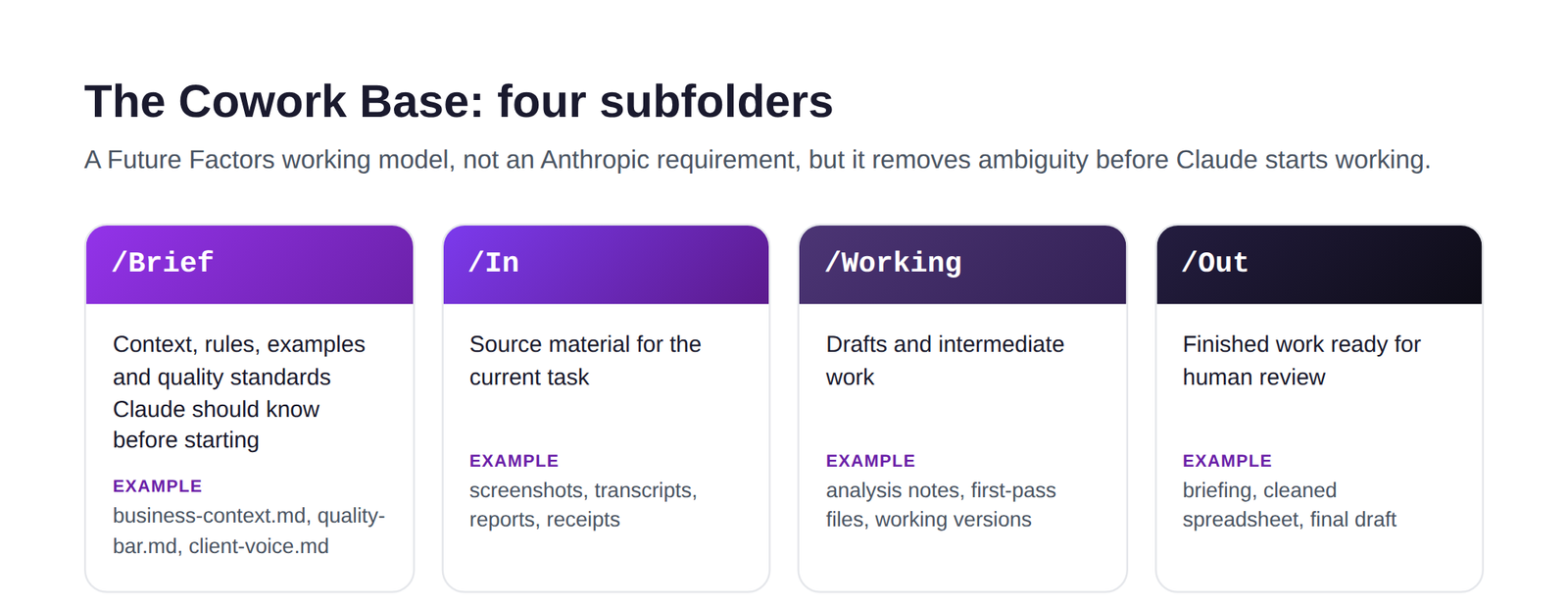
I like this setup because each folder answers a question. /Brief: what should Claude know? /In: what should Claude work from? /Working: where can Claude build? /Out: where should the finished deliverable land? You remove ambiguity before Claude starts working, and just as importantly, you know where everything belongs. I’ve seen people hand Claude a folder containing source files, old versions, approved versions, screenshots, notes and random exports, then get frustrated when Claude works from the wrong one. That’s not always an AI problem. Sometimes we handed our coworker a messy filing cabinet.
Once people create /Brief, something predictable happens: they fill it. Employee handbook, brand deck, mission statement, sales deck, company strategy, website copy, customer research, last year’s presentation, six PDFs, three spreadsheets, a ninety-page brand guide. The thinking makes sense: Claude needs context. It does. But Claude needs useful context, and those aren’t the same thing. A thirty-line file written specifically for the job at hand is often far more useful than a seventy-page deck built for your board.
If I were setting Claude up for a consulting business, I might create business-context.md and write something like: “We help mid-market organizations adopt AI in practical business workflows. Our audience is generally non-technical professionals, managers and senior leaders. We explain AI in plain English and connect every recommendation to real work. Avoid generic claims about AI transformation. Recommendations should be specific enough for a reader to know what to do next.” Then perhaps audience.md: “Most readers are intelligent business professionals who don’t need technical detail unless the detail changes a decision. Assume they’re busy. Explain unfamiliar AI terms the first time they appear.” Then quality-bar.md: “Strong work is specific, practical, evidence-based and easy to act on. Flag uncertainty. Never invent a source, statistic, customer fact or company policy. Separate factual observations from interpretation. Finished work should need editing, not rebuilding.” Now Claude has something meaningful to work with.
One of the simplest things people skip is showing Claude examples. They’ll spend fifteen minutes describing a tone as “smart,” “warm,” “conversational,” “executive,” “human,” then leave Claude to guess what those words mean to them specifically. Better to give Claude one example you like and one you dislike, and explain why: “I like Example A because the writer gets to the point quickly, explains technical ideas without sounding simplistic, and uses specific examples. I dislike Example B because the writing sounds promotional, overuses abstract language, and says a lot without giving the reader anything concrete to do.” That teaches Claude more than another paragraph of adjectives ever will.
I also wouldn’t build one enormous “Claude brain” file. Different information changes at different speeds: your company description may stay stable for months, a client preference may change tomorrow, your quality standard improves as you use Claude more, a task-specific rule may matter only for one workflow. Separate files make updates easier, which leads to one of my favorite rules for working with Cowork: every recurring correction is a candidate for permanent context. If you tell Claude the same thing three times, ask whether that instruction belongs in your setup instead of your next prompt.
This sounds like a small distinction, but it helps a lot. Context tells Claude what Claude should know. Rules tell Claude how Claude should behave. Those belong in different places. Claude currently supports instructions at several levels, including broader Claude-wide instructions, Project-level instructions, and folder-specific instructions for relevant desktop workflows, and Projects maintain their own files, instructions, context and memory.[3]
| Level | Put this here | Example |
|---|---|---|
| Global | Preferences that should follow most of your work | “Use plain language. Flag uncertainty. Do not invent sources.” |
| Project | Rules and knowledge specific to one ongoing body of work | “This client uses Canadian spelling and wants one-page executive briefs.” |
| Folder | Rules for how Claude should work with this workspace | “Never alter files in /In. Drafts go into /Working. Proposed final files go into /Out.” |
That hierarchy saves a lot of repeated prompting. Original to Future Factors AI.
A solo consultant may put more into global instructions, since the same voice carries across most of their work. An agency with ten clients should keep global instructions lighter and push client-specific rules down into projects or folders, otherwise one client’s preferences start contaminating another client’s work. Yes, I’ve seen versions of that happen.
Now we can talk about connectors, Skills and plugins. This is where people get tempted to turn setup into a collecting game, installing everything at once. Please don’t. Claude’s Customize area brings Skills, connectors and plugins together in one place. Connectors let Claude access external services such as Google Drive, Gmail and Slack, subject to the permissions you already have in those systems, and mirror your existing access rather than granting anything new.[5] Plugins bundle Skills, connectors and sub-agents into one packaged workflow, installed from that same Customize menu.[6]
That opens up a lot, but more access isn’t automatically a better setup. I use a simple rule: connect the workflow, not your digital life. If your weekly leadership brief needs Slack and Google Drive, start there. If your competitor scan uses six screenshots dropped into /In, you may need no connector at all. Every connector should have an answer to “what part of this workflow requires this access?” If nobody knows, leave the connection out for now.
I like Skills. I like plugins. I still wouldn’t start there. A Skill teaches Claude how to perform a repeatable kind of work, and Anthropic recommends Skills built around a specific, repeatable task, with clear instructions and examples included where they’re helpful.[7] That becomes useful after you know the process. The order I prefer: do the job with Claude, notice what keeps repeating, improve the instructions, turn the stable process into reusable context or a Skill, then package a broader workflow once the repetition actually justifies that step. Automating a poorly understood process just helps the poor process run more consistently. I want to see where the exceptions are first, where Claude gets confused, which instruction keeps getting repeated, and where human judgment actually enters, before I package anything.
This is the biggest behavior change. A prompt asks for an answer. A delegation brief hands over a job.
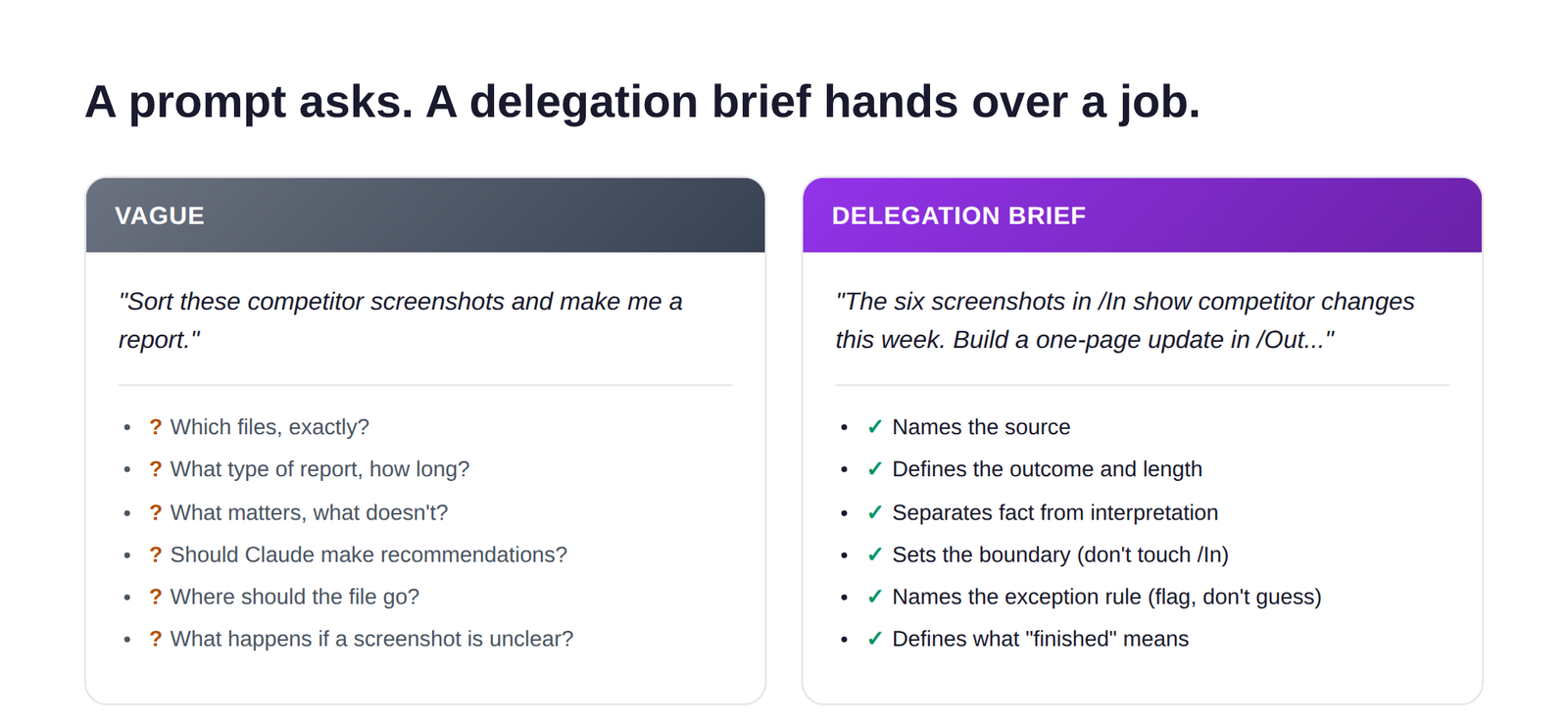
Compare “sort these competitor screenshots and make me a report” with something like: “The six screenshots in /In show competitor website changes from this week. Compare them and create a one-page competitor update in /Out. Group findings by competitor. For each competitor, identify what visibly changed and why the change may matter to us. Label business implications as interpretation rather than fact. Do not make a claim that cannot be supported by a source file. Flag anything unclear rather than guessing. Keep the report under 900 words. Do not modify anything in /In. Use manual approval for this first run. Finished means the report exists in /Out and passes the checks in /Brief/quality-bar.md.” That’s not “better prompting” in the usual sense. That’s better delegation: Claude knows the source, the outcome, the boundary, the quality standard, the exception rule, the location, and the definition of finished.
| Decision | Question |
|---|---|
| Outcome | What should exist when Claude finishes? |
| Inputs | What sources should Claude work from? |
| Rules | What standards and constraints matter? |
| Exceptions | What should Claude bring back rather than decide? |
| Review | What still requires a person? |
| Done | How do we know the work is complete? |
You don’t need to type six headings every time. You need the thinking behind them. Original to Future Factors AI.
This gets more important as AI systems become more agentic, and a good workflow should make the handoff visible. For the competitor example, Claude reads and compares the source material while you decide which market changes actually matter, Claude organizes the briefing while you choose any strategic response, Claude drafts the interpretations while you decide whether the interpretation is convincing. The goal isn’t keeping a human in every microscopic step forever. The goal is knowing where accountability sits. My test: if Claude makes a bad call here, who has to explain the decision? That person should understand the workflow and the review point.
Claude currently gives you different levels of control over how often it pauses before taking an action. Manual remains the default and pauses for your approval on connector actions. Auto lets Claude continue with automated safety screening, where read-only actions proceed and write or delete actions get evaluated. Some Cowork environments also expose Skip, which removes those pauses and the automatic screening entirely.[2] Anthropic specifically recommends closer oversight for consequential work involving messages, important files, money or other meaningful actions.
For a new workflow, I use Manual. Not because Claude is incapable, but because the first run is diagnostic. I want to see where Claude looks, what it assumes, which source it treats as authoritative, where it asks a good question, where it makes a decision I expected it to escalate instead, and which part of my instructions was less clear than I thought. The first few runs teach you how to improve the workflow, and that information is valuable. Move toward more autonomy after the workflow earns trust, not before.
Then run something boring on purpose. Resist the urge to make your first task dramatic, the flashy demo is rarely the best teacher. Choose something slightly annoying that you already understand, with a predictable shape to the finished result. Drop six competitor screenshots into /In, put your business context and quality bar in /Brief, then ask Claude to review them, build a one-page weekly competitor update in /Out, group findings by competitor, separate visible factual changes from interpretation, flag anything unclear, keep it short enough for a leadership team to read in five minutes, and check it against your quality bar before finishing. Then watch. Don’t evaluate the run by asking “can Claude do this.” Ask “would I use the result.” That’s a much better business test.
Your first workflow will expose problems. Good, those problems are showing you what your setup was missing. If Claude writes seven pages when you wanted one, don’t keep saying “make this shorter,” add a rule: executive briefings must fit on one page and include only information that changes a priority, risk or decision. If Claude keeps mixing facts with recommendations, add a rule to separate source-backed observations from interpretation and label the interpretation. If Claude overwrites a file, add a rule to never overwrite an existing file and create a new version instead. This is how the system gets better, not through one mythical perfect prompt, but through learning from repeated friction and updating the environment. One person keeps correcting the same mistake. The other turns the correction into a rule.
Scheduled tasks are one of the more useful Cowork capabilities once a workflow has matured. Claude can run recurring jobs like daily briefings, weekly reports and team updates, with access to the same connectors, Skills and plugins as a regular Cowork task. Cloud-based schedules keep running even when your computer is asleep or the desktop app is closed, though a task that depends on local files or apps will only run while your computer is available.[8] I wouldn’t schedule the first version of anything. Run the workflow manually first, several times, and find the weird cases: what happens when the source file is missing, when two systems disagree, when there’s nothing worth reporting, when Claude can’t verify something. Then schedule. A recurring task multiplies your workflow, flaws included.
Maybe, but probably not on day one. Claude can work through supported desktop applications by clicking, typing and navigating the screen when computer use is turned on, and it’s currently in beta for Pro and Max plans. Anthropic itself notes that Claude generally works faster and more reliably through a direct connector than by navigating a screen, since pulling messages through an API-based connection takes seconds while clicking through the same interface takes much longer and is more error-prone.[9] My preference: a trusted connector first when one exists, a browser workflow when that makes more sense, computer use only when the job genuinely needs direct screen interaction. Don’t give Claude broad computer access because moving the cursor around looks impressive in a demo. Access should earn its place in the workflow.
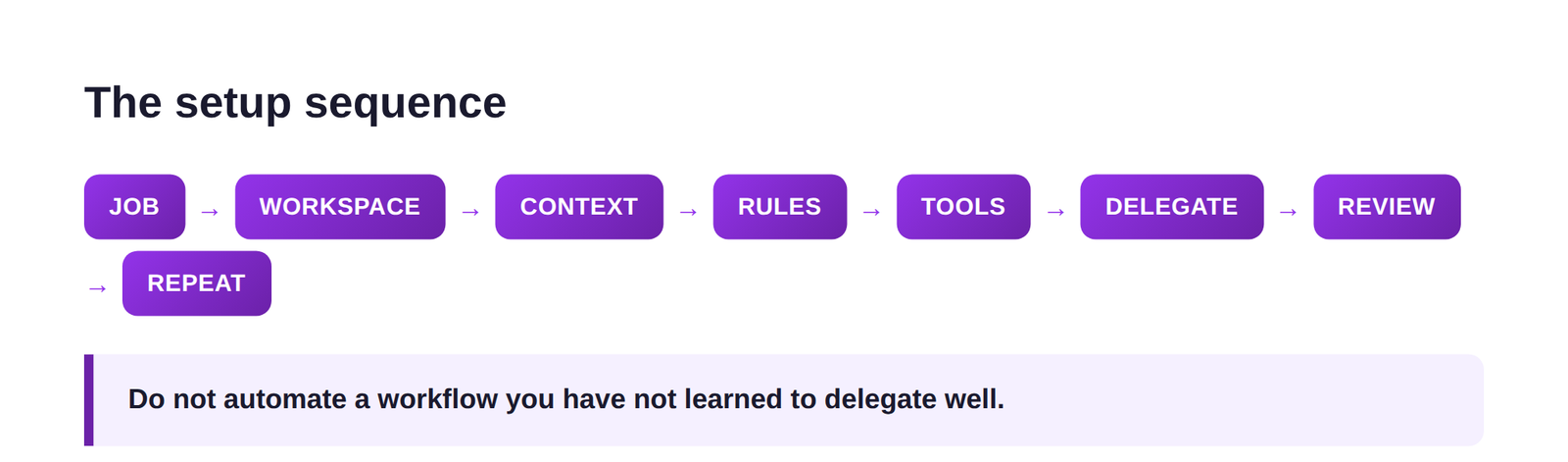
If you’re reading all of this thinking, okay, what do I actually do first, here’s the sequence I’d use: choose one recurring job, create one dedicated Cowork workspace with /Brief, /In, /Working and /Out, write two short context files starting with business-context.md and quality-bar.md, add standing rules keeping broad preferences global and workspace-specific behavior local, connect only what the job needs, write a delegation brief, run it on Manual, turn repeated corrections into rules, add a Skill or plugin once repetition justifies one, and schedule last.
The setup mistakes I see most, in roughly the order they show up: connecting too much too soon, since more access just creates more places Claude needs to make decisions; uploading information instead of creating context, since a pile of documents isn’t the same as a clear explanation of your business, audience and quality standard; trying to solve a weak setup with longer prompts, when the background you keep repeating belongs somewhere more permanent instead; installing every plugin immediately, before you understand the job the plugin should support; leaving “good” undefined and expecting Claude to guess it; letting Claude guess at exceptions instead of naming the situations it should flag; moving to Auto because Manual feels slow, when the slow first runs are exactly what shows you where the workflow needs work; treating /Out as approved when finished by Claude and approved by your business are two different statuses; scheduling too early, before the workflow is stable; and measuring only the fast step, when a workflow that saves thirty minutes of doing and creates forty minutes of reviewing hasn’t actually saved anything yet.
The biggest change with Cowork isn’t that Claude can create a spreadsheet or move files around, useful as that is. The more meaningful change is that we’re starting to design work for an AI system that can hold context, follow standing instructions, use tools, take multiple steps and return finished work. That forces you to get clearer about your own processes: what does good look like, what source should someone trust, what should happen when information is missing, who has authority to decide, which steps are mechanical, where does experience matter. Those are operations questions, and that’s why I think the people who get the most from Cowork won’t necessarily be the people who write the fanciest prompts. They’ll be the people who can describe how good work actually gets done.
If I were picking a place to start this week: pick the recurring task you’re most tired of doing manually, not the biggest one, the annoying one. Create your Cowork Base, write one short context file, write one quality standard, set one global rule and a few folder rules, then hand Claude a real job and watch the first run closely. Every mistake tells you something about the workflow, the context, the rules, or the boundary you forgot to define. Fix that piece, run the job again. Because the shift from chat to Cowork isn’t “Claude gives better answers now.” The shift is that you can hand Claude a defined piece of work, and Claude knows enough about your business, your standards and your boundaries to bring something useful back. That’s when Claude starts becoming more than another place to type prompts.
Cowork runs on the same agentic architecture as Claude Code: it can lay out a plan, work through multiple steps, read and write files in a folder you’ve connected, and hand back a finished deliverable instead of a reply. Chat answers one message at a time and only sees what you paste into it. As of September 2026, Anthropic is folding both into a single Claude experience where Claude itself decides which mode a request needs, rolling out first to Pro and Max plans.
Create one dedicated folder just for Cowork, not your whole Documents or Desktop. Inside it, build four subfolders: /Brief for your context files and house rules, /In for raw material, /Working for drafts, and /Out for finished, reviewed output. Connect that folder to Cowork on desktop, and expand access only once the workflow genuinely needs more.
Keep them short and specific: what your business does in a few sentences, who reads the output, your preferred tone with one example you like and one you don’t, and what good looks like for the recurring task you’re starting with. A thirty-line file that actually gets read beats a sixty-page one that gets skimmed.
Global instructions apply across most of your Claude work and suit standing preferences, like your tone or a rule about always showing a plan before touching several files. Project instructions hold whatever’s specific to one ongoing body of work, like a single client’s formatting rules. Folder instructions attach to one connected workspace and cover how Claude should behave inside it specifically, like never altering files in /In.
Safe is relative: Cowork is safer than giving it unrestricted access, but it isn’t risk-free. Cowork can only work in folders you connect, deletion always needs approval under Manual and Auto modes, and your approval mode controls how much else it does without asking first. I recommend Manual for any new business workflow, since the first several runs are diagnostic, they show you where Claude looks, what it assumes, and where your instructions were less clear than you thought. Auto can make sense once you’ve seen how Claude behaves and the workflow carries suitable risk. Anthropic’s own guidance recommends limiting local file access to specific working folders, avoiding sensitive or financial documents, and closer supervision for anything involving money, important files, or messages sent on your behalf.
The product-behavior claims in this guide, folder-based file access, the Manual, Auto and Skip approval modes, deletion protection, global versus project versus folder instructions, Projects, scheduled tasks, Skills, plugins, connectors, computer use, and the September 2026 Cowork-into-Claude change, are checked directly against Anthropic’s own current Claude Help Center documentation and official blog posts, linked below, as of late September 2026. Product screens and labels may continue to change as that rollout expands. The Cowork Base folder structure, its naming, the delegation brief framework, and the worked examples are Future Factors’ own, built for this guide rather than borrowed from any outside source.
